If you get lots of phone calls that the users can’t do anything because one single user is locking the table you quickly end up in a stressful situation. This entry will be about to how to solve the locking and hopefully find the user that created the lock.
Read the rest of this entry »Tag Archives: Telemetry
How to Find a User From the User Telemetry ID
In my previous log entry I described how to find activity for a specific user in telemetry from Microsoft Business Central. This entry will be about doing the opposite, having a User Telemetry ID and then try to find which user it belongs to. The solution to this varies depending on which Business Central version you are running and which platform.
Read the rest of this entry »How To Show Business Central Server Information In Telemetry
In Business Central it is standard to not show server specific information in telemetry. The reason for this is that many run the SaaS version which makes server information irrelevant since the end users don’t need to care about server information. However, some us still have customers that run OnPrem which this information can be quite useful. One of our customers has multiple servers with job queues activated on all of them. One way of troubleshooting job queues is to look at if a certain server is the source of problem and to do that we need server information in the telemetry.
In this blog entry I will explain how you can create your own telemetry message that send the job queue entry status and server information to application insights.
AL0000G7I – Multiple custom dimensions with the same dimension name provided.
There is a telemetry event Id called: AL0000G7I – Multiple custom dimensions with the same dimension name provided.

Currently (2023-12-15) this event hasn’t been documented in the offical page for telemetry events.
The reason for the error can seem pretty straightforward. Probably you have added the same dimension twice to the dimension dictionary.

However, this wasn’t the scenario in my case.
There is a function that you can add telemetry dimensions that should be appended to ALL telemetry events (from the current app).
In codeunit 8706 “Telemetry Custom Dimensions”, you can subscribe to the event OnAddCommonCustomDimensions and from that you can append custom dimensions.
    [EventSubscriber(ObjectType::Codeunit, Codeunit::"Telemetry Custom Dimensions", OnAddCommonCustomDimensions, '', false, false)]
    local procedure OnAddCommonCustomDimensions(sender: Codeunit "Telemetry Custom Dimensions")
    begin
        sender.AddCommonCustomDimension('ServerInstanceID', format(Database.ServiceInstanceId()));
        sender.AddCommonCustomDimension('ServerInstanceName', GetServerInstanceName());
        sender.AddCommonCustomDimension('ServerName', GetServerName());
    end;
And as you probably you have understood by now it was here that I got the error with the same dimensions. I tried to log send the dimension ServerName multiple times.
And there it is, I hope it solved your error.
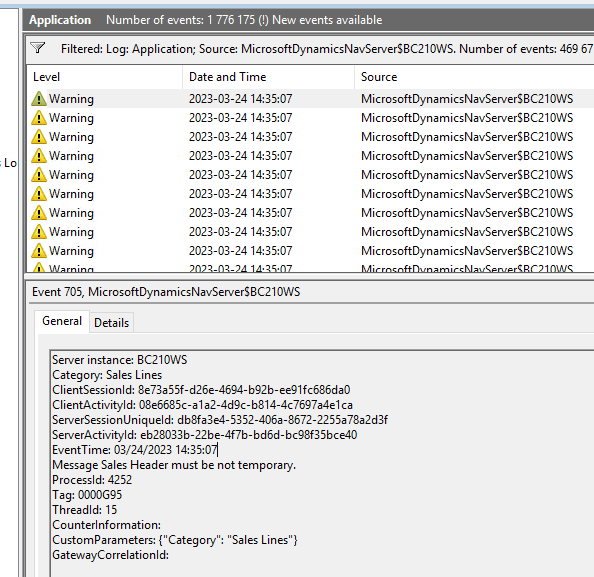
Tag: 0000G92 – Sales Header must not be temporary
Are you running OnPrem and you get a lot of warnings “Tag: 0000G92 – Sales Header must not be temporary” or “Tag: 0000G95 – Sales Header must not be temporary” in the event viewer like this?
 NAVfreak