RSS

Category Archives: Okategoriserade

Dynamics NAV ClickOnce: Failed while downloading…

If you try to install your ClickOnce application and get errors like this I’ll show you what Microsoft recomends you to do:

SUMMARY
Below is a summary of the errors, details of these errors are listed later in the log.
* Activation of http://xxx.xxx.xxx.xxx/App.application resulted in exception. Following failure messages were detected:
+ Failed while downloading http://xxx.xxx.xxx.xxx/App.exe.manifest
+ The remote server returned an error: (404) Not Found.

Your problem is probably that your deployment contain files that the webserver (if a webserver installation) doesn’t support download. The fix is to change the mime types to the current webserver. Read the rest of this entry »

 
Leave a comment

Posted by on 2014-11-13 in Okategoriserade


Tags: , , , ,

Net.TCP Port Sharing: Dynamics NAV 2015 and Azure

If you come from the Dynamics NAV community you probably have seen the blog post from one of my favorite bloggers: Port Sharing with NAV2013. This blog describes in detail on how to set up port sharing to several NAV service tiers (NST).

So what is new then? If you run the 1VM/2VM script it will by default install a NST service with a local user account instead of using one of the system accounts. So if you follow Waldo´s instructions on how activate port sharing you will get an error like this:

The service MicrosoftDynamicsNavServer$DynamicsNAV80_Instance1 failed to start. This could be caused by a configuration error. Detailed error information:System.ServiceModel.CommunicationException: The service endpoint failed to listen on the URI ‘net.tcp://SERVERNAME:9001/DynamicsNAV80_Instance1/Service’ because access was denied. Verify that the current user is granted access in the appropriate allowAccounts section of SMSvcHost.exe.config. —> System.ComponentModel.Win32Exception: Access is denied
at System.ServiceModel.Activation.SharedMemory.Read(String name, String& content)

Read the rest of this entry »

 
1 Comment

Posted by on 2014-10-27 in Okategoriserade


Tags: , , , ,

Azure Get-AzureSubscription: Same SubscriptionName And Blank SubscriptionID

I was going to set up a new azure environment for a new customer with a powershell script when I encountered the following error:

Get-AzureVNetConfig : Value cannot be null.
Parametername: subscriptionId
At line:1 char:1
+ Get-AzureVNetConfig
+ ~~~~~~~~~~~~~~~~~~~
+ CategoryInfo : NotSpecified: (:) [Get-AzureVNetConfig], ArgumentNullException
+ FullyQualifiedErrorId : System.ArgumentNullException,Microsoft.WindowsAzure.Commands.ServiceManagement.IaaS.GetAzureVNetConfigCommand

It seems that I was too quick to start with the new environment. I had forgotten to download the latest publishsettings file which contains the new customer subscription.

What instead happened now was that it created a new subscription named “CUSTOMERNAME” with SubscriptionID blank.

Read the rest of this entry »

 
Leave a comment

Posted by on 2014-10-25 in Okategoriserade


Tags: ,

Dynamics NAV ClickOnce: Install 2013/2015 Help Server

One of the less good things with the 1VM/2VM script is that it doesn’t install a NAV help server.

So in order to get the help server to work with the newly installed ClickOnce client in your Azure environment you have to do the following things:

  1. Install the help server from the NAV DVD on the current machine
  2. Add the help server URL to ClientUserSettings.config in the ClickOnce folder
  3. Add an endpoint to the Azure VM in the Azure portal
  4. Update the ClickOnce deployment

Read the rest of this entry »

 
1 Comment

Posted by on 2014-10-18 in Okategoriserade


Tags: , , ,

Dynamics NAV ClickOnce: “File, FILENAME application identity.manifest, has a different computed hash than specified in manifest.”

Ok, you have probably landed here because you are trying to update your ClickOnce deployment but gets the error “application identity.manifest, has a different computed hash than specified in manifest.” .

In my case the reason was that I had done the wrong order when building the deployment.

Read the rest of this entry »

 
2 Comments

Posted by on 2014-10-18 in Okategoriserade


Tags: , ,

Dynamics NAV Role Center: Wrong Language In Profile

We had this customer where the role centers/profiles seemed messed up. The language was in swenglish, a combination of both swedish and english.

SwenglishProfile

First I thought this was a another bieffect of cumulative update 8 to Dynamics NAV 2013 R2 were Microsoft screwed and missed and wrote over several local language captions. Affected countries are Sweden, Norway, Denmark, Germany and perhaps some more. Hopefully they will fix it to cumulative update 12. Anyway, I checked it and this wasn’t the fault so I did what every smart person does. I googled it.  Trying to find some information by googling phrases like:

Wrong language in the ribbon

Profile with wrong language

Role center language problem

But I came up very short. When I investigated the issue further I noticed that the faulty captions couldn’t be changed in either pages or menuitems. I then realised that the language must be like the charts, it is localized and is found in a blob somewhere. I found How to:Export or Import Profiles on msdn. By exporting it to a XML file and open it I could verify that I have found the source to my language problem.

So why did we have faulty language version? I realised that the cronus database we were using didn’t come from a swedish installation but came from our add-on partner which had used a W1 version. Why did they use a W1? Well, it is an international addon and it is always easier to demo and maintain a version in W1 then maintaining it in other languages.

The solution is export all the profiles from a swedish cronus and then import them into the target database. I calculated the profiles to be ~25 so it would take some time to export/import them all since you can only do it one by one. But since I like automation I instead created a tool that exports all the profiles and imports them all at once. If you are interested in having it, comment and I’ll maybe publish the code in a blog post.

 
Leave a comment

Posted by on 2014-10-07 in Okategoriserade


Tags: , ,

Dynamics NAV Performance: Record Data Operations

NAV has come very far as product and it has changed a lot over time and the big question today is, do you change with it or do you code like it is 1990? 🙂

When we were using native databases we used find(‘-‘) to find a record set. When SQL arrived we instead used findfirst because it was much faster. But what should we use nowadays?

I have created a function to measure all the record operations in a 2009 R2 SQL environment and in a 2013 R2.

Here is an example of the measuring code:

InitTime := TIME;
FOR Loop:=1 TO RECLoop DO BEGIN
  GLEntry.RESET;
  GLEntry.SETRANGE("G/L Account No.",'2645');
  IF GLEntry.FINDFIRST THEN;
END;
FindSetDuration := TIME - InitTime;

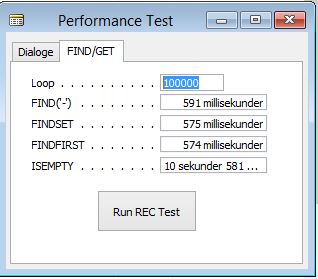
Lets take a look at the result in Dynamics NAV 2009 R2 (SQL):
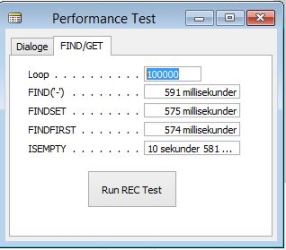
PerformanceRecordDataOperations2009

Here are no big surprises. Find(‘-‘) is not the fastest operation anymore since the switch from native to sql database. Findfirst is the fastest operation and is good to use if you just want to see if a record set is empty or not.

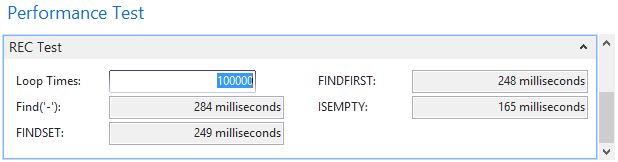
Lets take a look at the result in 2013 R2:
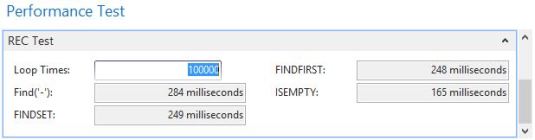
Performance2013RecordDataOperations

If you start by comparing the overall times with the 2009 you can see major difference. Both tests have been run on the same machine, same and yet the 2013 R2 version is almost twice as fast as the 2009!

The next big surprise is IsEmpty. In 2009 R2 this was the slowest operation, in 2013 R2 this is the fastest operation!

What can we learn from this? If we want to optimize your code from a SQL perspective we should use IsEmpty instead of findfirst whenever we need to check if a record set is empty or not. For instance:

Setrange(x)
If findfirst then begin
  Findset
  Repeat
     //Do stuff
  Until next = 0;
end;

Should now instead be:

Setrange(x)
If Not IsEmpty then begin
  Findset
  Repeat
     //Do stuff
  Until next = 0;
end;
 
2 Comments

Posted by on 2014-10-07 in Okategoriserade


Tags: ,

Dynamics NAV Language Module: Import All Charts

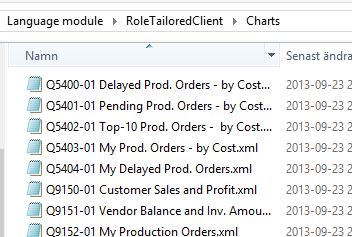
If you have downloaded a language module to 2013 or 2013 R2 you will have a folder containing all the charts in that language.

The charts in the language module

The problem is that in standard Dynamics NAV you can only import them one by one plus that the function is real crappy!

But don’t worry, I’m going to give you the code to import all of them at the same time.

If you don’t have a language module but instead a cronus databas in another language and want to export all charts from that dabase see the blog post Dynamics NAV: Export All Charts

The principle behind this code is to filter out the files in the folder. For each file, upload it to the server, extract the ID and the name from the filename.
Create a new record, create a outstream to the file and instream to the blob in the record. Copy the outstream to the instream.

Here is the entire code in Dynamics NAV 2013 R2 text format. Copy and paste into a text file and import.

OBJECT Codeunit 93040 Import All Charts
{
 OBJECT-PROPERTIES
 {
 Date=14-09-25;
 Time=23:02:44;
 Modified=Yes;
 Version List=NAVfreak.com;
 }
 PROPERTIES
 {
 OnRun=VAR
 Description@1000000001 : Text;
 ID@1000000000 : Code[20];
 Name@1000000002 : Text;
 BEGIN
 IF NOT CONFIRM('Do you really want import all charts?',FALSE) THEN
 ERROR('');
 ImportAllCharts('C:\temp\');
 MESSAGE('Done');
 END;

 }
 CODE
 {

 PROCEDURE ImportAllCharts@1000000001(Path@1000000000 : Text);
 VAR
 TempTempBlob@1000000011 : TEMPORARY Record 99008535;
 FileList@1000000001 : Record 2000000022;
 Chart@1000000004 : Record 2000000078;
 FileManagement@1000000006 : Codeunit 419;
 TempFile@1000000002 : File;
 NVInStream@1000000010 : InStream;
 Outstream@1000000009 : OutStream;
 Description@1000000008 : Text;
 FileName@1000000005 : Text;
 ToFile@1000000007 : Text[1024];
 ID@1000000003 : Code[20];
 BEGIN
 FileList.SETRANGE(Path,Path);
 FileList.SETRANGE("Is a file",TRUE);
 FileList.SETFILTER(Name,'@*.xml');

 IF NOT FileList.FINDSET THEN
 ERROR('Did not find any files in folder %1',Path);

 REPEAT
 FileName := COPYSTR(FileList.Name,1,STRPOS(FileList.Name,' ')-1) + ',' + COPYSTR(FileList.Name,STRPOS(FileList.Name,' ')+1); //Unmark this if you use my chart exporting code
 ID := SELECTSTR(1,FileName);
 Description := SELECTSTR(2,FileName);
 Description := COPYSTR(Description,1,STRLEN(Description)-4);

 IF NOT Chart.GET(ID) THEN BEGIN
 FileName := FileManagement.UploadFileSilent(Path + '\' + FileList.Name);
 TempFile.OPEN(FileName);
 TempFile.CREATEINSTREAM(NVInStream);

 Chart.INIT;
 Chart.ID := ID;
 Chart.Name := Description;
 Chart.INSERT(TRUE);
 Chart.BLOB.CREATEOUTSTREAM(Outstream);
 COPYSTREAM(Outstream,NVInStream);
 Chart.MODIFY;
 TempFile.CLOSE;
 COMMIT;
 FileManagement.DeleteServerFile(FileName);
 END;
 UNTIL FileList.NEXT = 0;
 END;

 BEGIN
 {
 **************************
 **** www.NAVFreak.com ****
 **************************
 Blog Post: https://navfreak.com/2014/09/25/dynamics-nav-language-module-import-all-charts/
 }
 END.
 }
}

More information: How To Install Language Modules

 
1 Comment

Posted by on 2014-09-25 in Okategoriserade


Tags: , , , , ,

Dynamics NAV Charts: Export All Charts

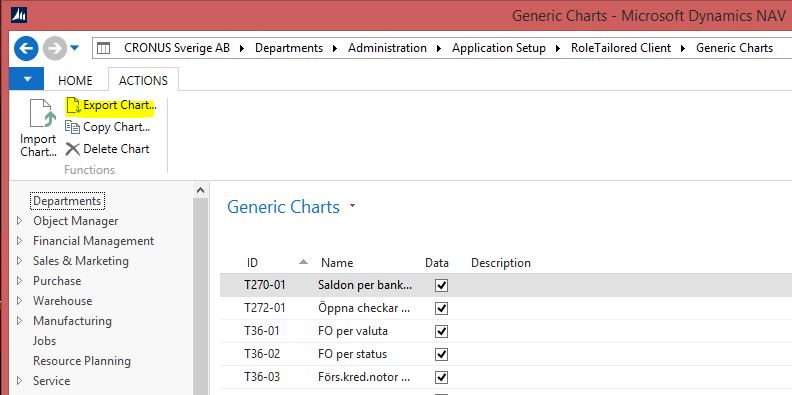
You have probably ended up here because you want to export all charts but the standard NAV functionality only lets you export them one by one ( Generic Charts on msdn). Maybe you currently are upgrading a customer database from a pre Dynamics NAV RTC version and now you want to add the charts to the current database.  Or you have a database with a different language base and want to export/import the charts from another database with a different language. Anyway, see code below.

Export_Generic_Charts

I have created a codeunit that exports all charts by iterating trough all charts, checking if the current record has a blob value. If it has a value create a stream that streams the data to a local temp file on the server, then download the file from server to the specified folder on the client. Finally, delete the server file.

Here you can find the entire code in 2013 R2 format. Just copy and paste into a text file. Save and import.

Beware, you need a developer license to import the object and after that you need to make sure or rename so the object is within the customer’s license.

Once done you will probably want to import all the charts to the target database. Here you can read about importing all Dynamics NAV charts.

OBJECT Codeunit 93041 Export All Charts
{
 OBJECT-PROPERTIES
 {
 Date=14-09-25;
 Time=19:11:46;
 Version List=NAVfreak.com;
 }
 PROPERTIES
 {
 OnRun=BEGIN
 IF NOT CONFIRM('Do you really want export all charts?',FALSE) THEN
 ERROR('');
 ExportAllCharts('C:\@tmp\diagram\');
 MESSAGE('Done');
 END;

 }
 CODE
 {

 PROCEDURE ExportAllCharts@4(Path@1000000002 : Text) : Text;
 VAR
 TempTempBlob@1000000001 : TEMPORARY Record 99008535;
 Chart@1000000000 : Record 2000000078;
 FileManagement@1000000006 : Codeunit 419;
 TempFile@1000000003 : File;
 NVInStream@1003 : InStream;
 Outstream@1000000004 : OutStream;
 FileName@1000000005 : Text;
 ToFile@1004 : Text;
 IsDownloaded@1007 : Boolean;
 BEGIN
 //Precondition: Path needs to end with a \
 IF NOT Chart.FINDSET THEN
 EXIT;

 REPEAT
 Chart.CALCFIELDS(BLOB);
 IF Chart.BLOB.HASVALUE THEN BEGIN
 TempTempBlob.Blob := Chart.BLOB;
 TempTempBlob.Blob.CREATEINSTREAM(NVInStream);
 FileName := FileManagement.ServerTempFileName('xml');
 TempFile.CREATE(FileName);
 TempFile.CREATEOUTSTREAM(Outstream);
 COPYSTREAM(Outstream,NVInStream);
 TempFile.CLOSE;
 ToFile := Path + Chart.ID +',' + Chart.Name + '.xml';
 FileManagement.DownloadToFile(FileName,ToFile);
 FileManagement.DeleteServerFile(FileName);
 END;
 UNTIL Chart.NEXT = 0;
 END;

 BEGIN
 {
 **************************
 **** www.NAVFreak.com ****
 **************************
 Blog Post: https://navfreak.com/2014/09/25/dynamics-nav-charts-export-all-charts/
 }
 END.
 }
}
 
1 Comment

Posted by on 2014-09-25 in Okategoriserade


Tags: , ,

Set up backups in Azure part 4 – Notifications

Ok, so now we have our backups, Windows Server Backup, Azure Backup and SQL backup. If you have used a normal SQL edition and not express you have probably used maintenance plans to notify when the jobs fail but if you use SQL express you need to do it in another way and that is what I’m going to show you. Read the rest of this entry »

 
Leave a comment

Posted by on 2014-09-23 in Okategoriserade


Tags: , , , , ,

 
Kauffmann @ Dynamics 365 Business Central

A good programmer makes all the right mistakes.

The BC Docs Librarian

Tips and news for AL programmers

Stefan Maroń

Dynamics 365 Business Central

James Pearson

Thoughts about Dynamics 365 Business Central, Git, Azure DevOps, PowerShell, Automated Testing, Visual Studio Code...and maybe some other stuff

Roberto Stefanetti BLOG

MVP & MCT Microsoft Dynamics 365 Business Central, Powershell, Azure, SQL Server

JoeBrown

DevOps starts with culture!

Comments for DevOps ABCs Blog

Reflections from the ERP field

DevOps ABCs Blog

Reflections from the ERP field

Dynamics 365 Business Central for Partners

Reflections from the ERP field

Freddys blog

Learn something new... - then Teach someone!

Stefano Demiliani Technical Blog

Reflections from the ERP field

David Worthington's NAV Performance Blog

Micosoft Dynamics NAV Performance Testing & Optimization

Freddys Blog

Reflections from the ERP field

Marije...

Storytelling and content creation

Vjeko.com

Ideas in the cloud

Goprowe AB

Reflections from the ERP field

ArcherPoint

Reflections from the ERP field

The NAV Viking´s Blog

- Sharing my experience in the Dynamics NAV world

Comments for

Reflections from the ERP field