Welcome to my third post about Setting up backups in Azure. This post will be about Windows Server Backup and Azure backup.
Read the rest of this entry »
Author Archives: Capone
Set up backups in Azure part 3 – Windows Server Backup & Azure Backup
Set up backups in Azure part 2 – SQL Backup
Time for the part two in this series which is going to be about SQL backups on a virtual machine in Azure. Read the rest of this entry »
Get your own SMTP server!
Many times when we are coding email functions in Dynamics NAV and using Codeunit 400 SMTP Mail we need to fill in a SMTP adress in the setup.
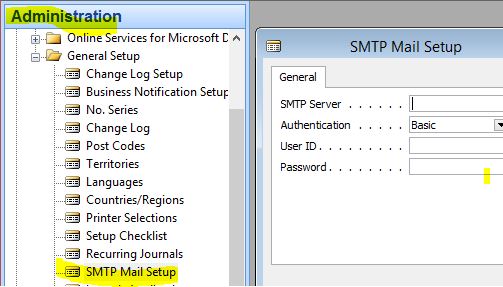
This is here where the hassle starts. You need to contact the customers hosting partner so they can fix/open up a SMTP account for you and of course you will get questions like why and when you need it and if it is really necesary. On top of that you also got their leadtime of answering emails. Instead you ask your companys exchange administrator and he says forget it!
I say screw them! Lets get our own SMTP server.
Now you problaby imagine something like downloading software and installing SMTP server software somewhere at the customer premises without being noticed. Nah, that is not the solution I had in mind 🙂
Instead get an account at http://sendgrid.com/ . This is a cloud based service that is used to seend thousands of marketing emails and then see statistics who read what. But! They also offer a SMTP server which you at the moment can send 200 emails a day for free!!
It takes 5-10 minutes before you get all the information you need but after that you don’t need to ask or wait for anyone to get you this type of information.
And another thing! This is excellent when you want to send notification emails from Azure, failed backups and so on.
Even noticed that Azure got a specific sendgrid plugin. Have to check it out later. Look at it here.
Set up backups in Azure part 1 – Strategies
Many partners only specializes in Dynamics NAV and not in hosting. Often the customers have their own servers and are responsible for backups or a partner is responsible for the hosting environment.
What I’m trying to say is that probably many NAV partners haven’t been responsible for SQL backups before and now with putting everything in Azure we are skipping the hosting partner and instead becoming our own hosting partner.
When we do this we need to have a strategy to tackle this new scenario with this blog post and following I would like to share some information from the field on how you can implement different backup strategies.
There are several ways to cover this and I’m going to mention the most obvious ones:
- SQL Backup
- Windows Server Backup
- Azure Backup
- System Center – Data Protection Manager
 NAVfreak