RSS

Tag Archives: Business Central

Business Central: Cannot determine the frame size or a corrupted frame was received.

We were setting up a new customer with Microsoft Business Central OnPrem and I tried to download the symbols from the customer remotely.
I knew the NST and firewall was configured but I still got the following error message when I ran AL:Download Symbols:

[2023-02-02 10:37:32.45] Using reference symbols cache path: c:\GIT\algo\BC21.alpackages
[2023-02-02 10:37:32.46] Sending request to https://<CompanyURL>.com:7389/<BC INSTANCE NAME>/dev/metadata?tenant=default
[2023-02-02 10:37:32.54] Error: The SSL connection could not be established, see inner exception.
Cannot determine the frame size or a corrupted frame was received.

[2023-02-02 10:37:32.54] Error: An error occured while processing the request.
Request ID: a8739f78-4316-4c39-ad9b-1353bddbee16
Session ID: 00721ee7-41e7-4f25-b1fc-354139dba1a6

If you are targeting a cloud instance, supply these IDs if contacting Microsoft support.
[2023-02-02 10:37:32.54] Sending request to https://<CompanyURL>.com:7389/<BC INSTANCE NAME>/dev/metadata?tenant=default
[2023-02-02 10:37:32.64] Error: The SSL connection could not be established, see inner exception.
Cannot determine the frame size or a corrupted frame was received.

[2023-02-02 10:37:32.64] Error: An error occured while processing the request.
Request ID: 6294518c-9186-4d82-bc5b-3dcf89a8c8be
Session ID: 00721ee7-41e7-4f25-b1fc-354139dba1a6

If you are targeting a cloud instance, supply these IDs if contacting Microsoft support

It turns out our technician had forgotten to enable the setting DeveloperServicesSSLEnabled to true.
Once activated it worked with downloading the symbols

.

.
 
Leave a comment

Posted by on 2023-02-02 in Okategoriserade


Tags: ,

Business Central: Can’t find/get invoices with API

We had a scenario were we did an OnPrem installation for a customer (BC 19.x). We had set up three NST, one for web clients, one for job queue and one for API. We had a Cronus database as a base were we created a new empty company besides the cronus company.
When we wanted to get posted invoices via API we couldn’t find any even though we had posted several invoices(!). First we thought something was wrong with the API NST but we could reach other companies and it became even weirder when we tried to access invoices in the cronus company, then it worked!

So why the hell did it work against the Cronus company in the same database with the same NST BUT NOT for our newly created company!? 🤔

Read the rest of this entry »
 
Leave a comment

Posted by on 2022-11-19 in Okategoriserade


Tags: , ,

How-To Compile a Business Central App/Extenssion Manually

How-To Compile a Business Central App/Extenssion Manually

Do you want to know how to compile your Business Central app manually as VS Code does? Then you will get started with this blog post.

Read the rest of this entry »
 
Leave a comment

Posted by on 2019-03-03 in Okategoriserade


Tags: , ,

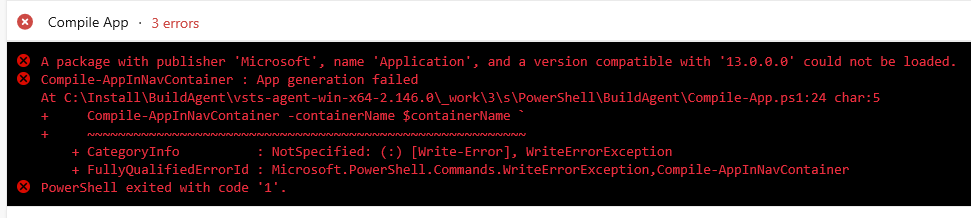
A package with publisher ‘Microsoft’, name ‘Application’, and a version compatible with ‘13.0.0.0’ could not be loaded.

A package with publisher ‘Microsoft’, name ‘Application’, and a version compatible with ‘13.0.0.0’ could not be loaded.

I recieved the following error when trying to build my Business Central App:
A package with publisher ‘Microsoft’, name ‘Application’, and a version compatible with ‘13.0.0.0’ could not be loaded.
Compile-AppInNavContainer : App generation failed At C:\Install\BuildAgent\vsts-agent-win-x64-2.146.0\_work\3\s\PowerShell\BuildAgent\Compile-App.ps1:24 char:5 + Compile-AppInNavContainer -containerName $containerName ` + ~~~~~~~~~~~~~~~~~~~~~~~~~~~~~~~~~~~~~~~~~~~~~~~~~~~~~~~~~ + CategoryInfo : NotSpecified: (:) [Write-Error], WriteErrorException + FullyQualifiedErrorId : Microsoft.PowerShell.Commands.WriteErrorException,Compile-AppInNavContainer
PowerShell exited with code ‘1’.

The scenario I had was an onprem extension version 13 that should be run on a cu 3 which relies on imported CSIDE objects. 

What I did to solve the problem was to follow my checklist for CSIDE objects not includes in symbols.

 
Leave a comment

Posted by on 2019-03-03 in Okategoriserade


Tags: , , ,

Business Central, CSIDE objects not included in symbols

Do you want to go hybrid where you mix your Business Central extensions with CSIDE objects and have problems with getting these objects included in symbols? Then you will find a checklist here that hopefully helps you to solve that issue.

Read the rest of this entry »
 
6 Comments

Posted by on 2019-03-03 in Okategoriserade


Tags: , , , , ,

 
Kauffmann @ Dynamics 365 Business Central

A good programmer makes all the right mistakes.

The BC Docs Librarian

Tips and news for AL programmers

Stefan Maroń

Dynamics 365 Business Central

James Pearson

Thoughts about Dynamics 365 Business Central, Git, Azure DevOps, PowerShell, Automated Testing, Visual Studio Code...and maybe some other stuff

Roberto Stefanetti BLOG

MVP & MCT Microsoft Dynamics 365 Business Central, Powershell, Azure, SQL Server

JoeBrown

DevOps starts with culture!

Comments for DevOps ABCs Blog

Reflections from the ERP field

DevOps ABCs Blog

Reflections from the ERP field

Dynamics 365 Business Central for Partners

Reflections from the ERP field

Freddys blog

Learn something new... - then Teach someone!

Stefano Demiliani Technical Blog

Reflections from the ERP field

David Worthington's NAV Performance Blog

Micosoft Dynamics NAV Performance Testing & Optimization

Freddys Blog

Reflections from the ERP field

Marije...

Storytelling and content creation

Vjeko.com

Ideas in the cloud

Goprowe AB

Reflections from the ERP field

ArcherPoint

Reflections from the ERP field

The NAV Viking´s Blog

- Sharing my experience in the Dynamics NAV world

Comments for

Reflections from the ERP field